Latest Updates
We’re back again with another quick run down of everything we shipped in the last few weeks:
New and Improved:
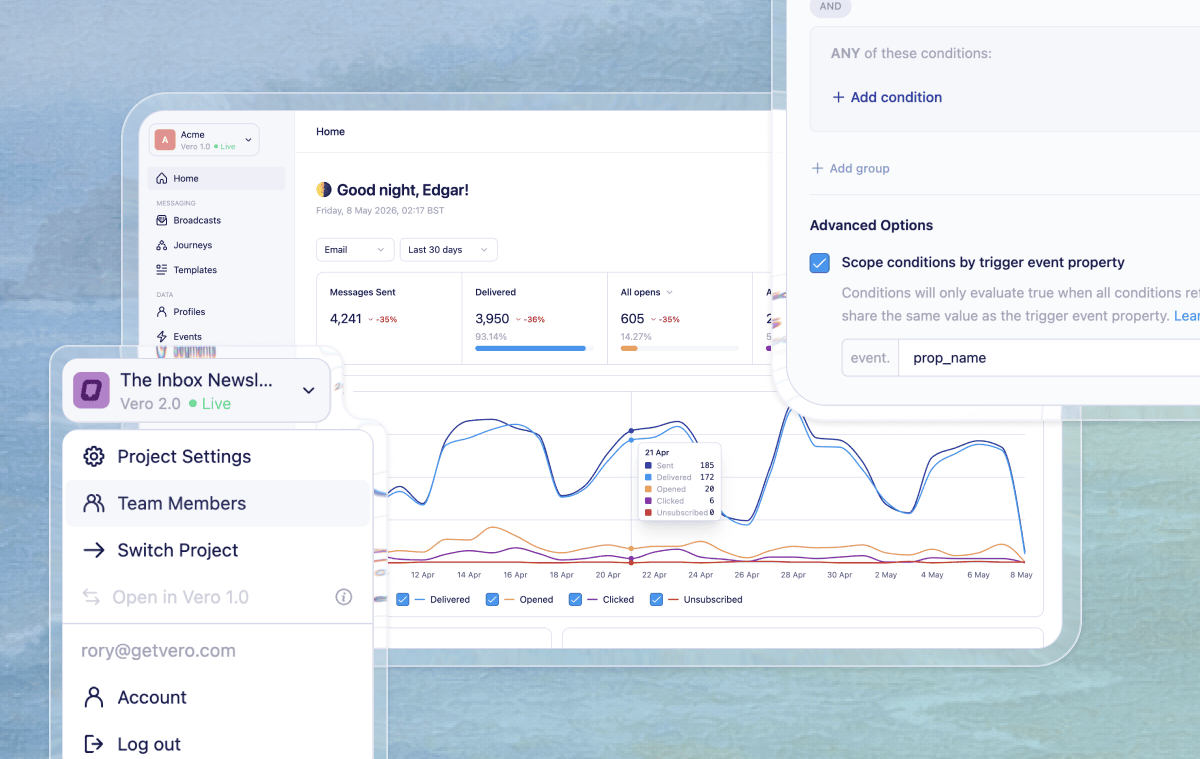
Project-level reporting on the home page - The Vero 2.0 homepage now shows a snapshot of your whole project’s messaging performance. At the top of the page you'll find top level summaries covering messages sent, open rate, click rate, delivery rate, unsubscribe rate — With options to view 7/30/90 date ranges, and delta comparisons for the prior period. Below the summary tiles, a new engagement chart plots your key metrics over time. You can toggle which stats appear using the checkboxes, so you can focus on the signals that matter most to you. It's the fastest way to understand how your account is performing without having to dig into individual campaigns.
Project delivery modes - Vero 2.0 projects can now be set to Live, Test, or Offline mode, with clear status indicators throughout the app. Test mode sends to a configured test email address, while Offline mode blocks delivery entirely. Launch screens now show warnings when a project is in Test mode and prevent sends when a project is Offline, helping teams avoid accidental sends. Read the help doc
Scope Journey conditions by event property - Vero 2.0 now supports condition scoping, letting you evaluate true/false node conditions against a specific event property value — so Vero matches events that share that value with the trigger event. This is particularly useful for abandonment-style Journeys, where a user might interact with multiple items and you want to follow up independently for each one they don’t act on. Read the help doc
Simpler navigation for project and account actions – Vero 2.0 now puts project switching, project settings, account access, and logout in one sidebar dropdown, so common actions are easier to find in one place.
Broadcast stats appear sooner – Broadcast rows now show key performance stats as soon as a send starts, instead of waiting until the broadcast is marked as sent. That gives teams earlier visibility into delivery and engagement while a broadcast is still in progress.
Fixes:
Safer event editing permissions - View-only teammates can no longer edit event descriptions.
Billing Fixes - fixed a billing page crash on subscriptions with multiple Stripe plans or missing metadata.
Smoother SQL editor on smaller screens – The SQL query editor layout has been cleaned up on narrower screens, with clearer required-column guidance and a simpler results header.
Journey true/false node issue - Fixed a bug that caused inconsistent path rendering when adding a true/false node in a Journey’s canvas.
Export button hidden - Fixed a bug that prevented the Export activity button on a user profile from being accessible if there was no activity in the last 30 days.
Workflow campaigns not present in Series conditions - Fixed an issue that prevented workflows campaigns from being selectable in Series filters in Vero 1.0.