July 31st, 2026
New
Improved
Fixed
Vero 1.0
Vero 2.0

Following our recent API and MCP launch, we’ve made several updates across Vero to make campaign management faster, API access easier to manage, and day-to-day campaign work more reliable.
As a reminder, we’re enabling the newly released Campaigns API and MCP server on a per account basis. Contact support@getvero.com if you would like access.
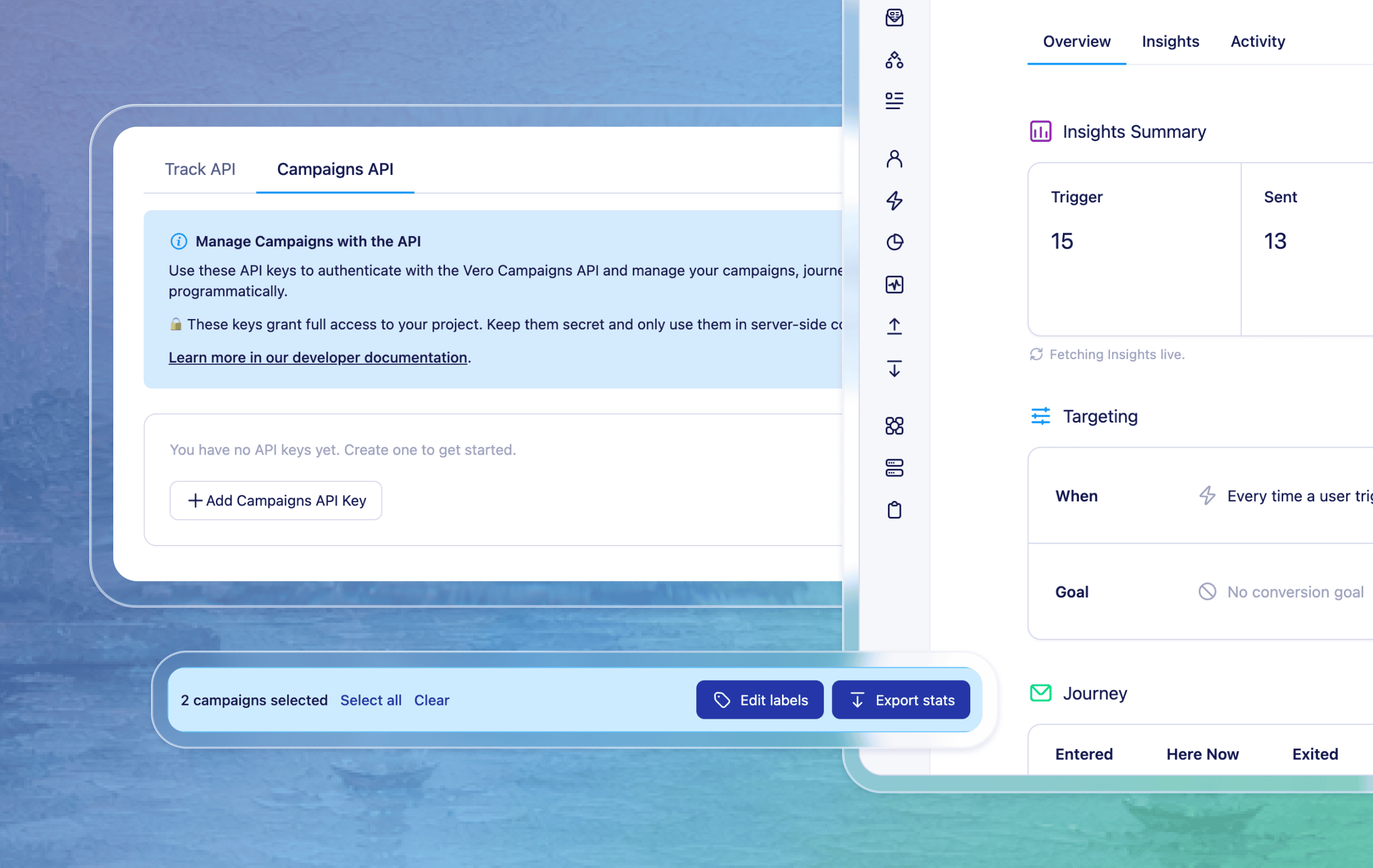
Bulk actions for campaigns in Vero 2.0 - You can now select multiple campaigns and take action on them together, including exporting campaign stats and adding or removing labels across matching campaigns. This makes it faster to organise, review, and manage larger campaign lists.
A more compact campaign setup experience - We reorganised the campaign screen into clearer “Targeting” and “Message/Journey” sections, and refreshed the layout so it’s easier to scan and edit.
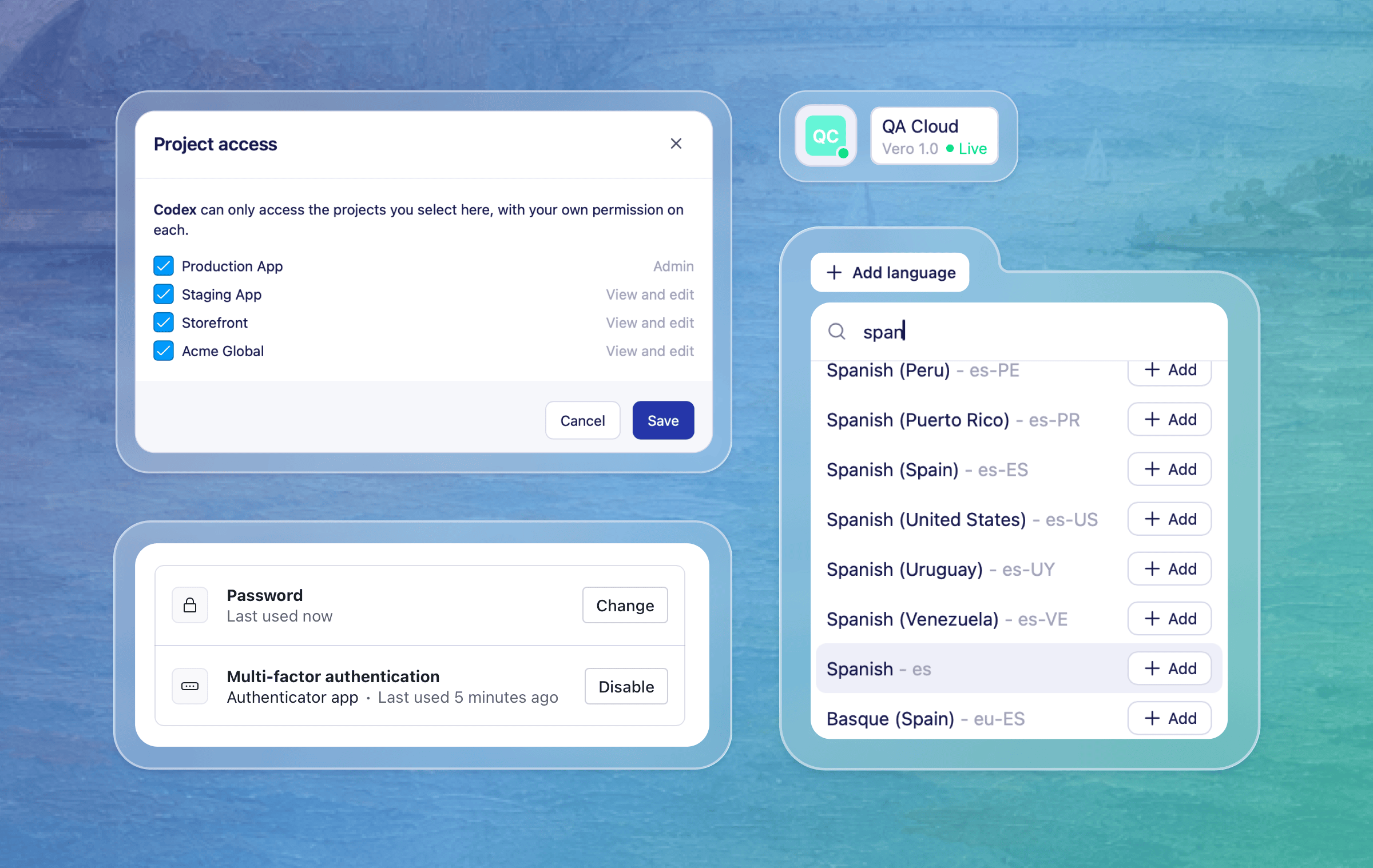
Easier Campaigns API key access in Vero 2.0 - Vero 2.0 now includes an API Keys section in project settings, so admins can create, copy, review, and revoke Campaigns API keys and Track API keys from the same place. This makes it easier to set up and manage the Campaign API keys needed for MCP-powered workflows.
Clearer API key settings in Vero 1.0 - We also updated API key labels and actions in Vero 1.0 to make it clearer which keys are used for tracking and which are used for Campaigns API access.
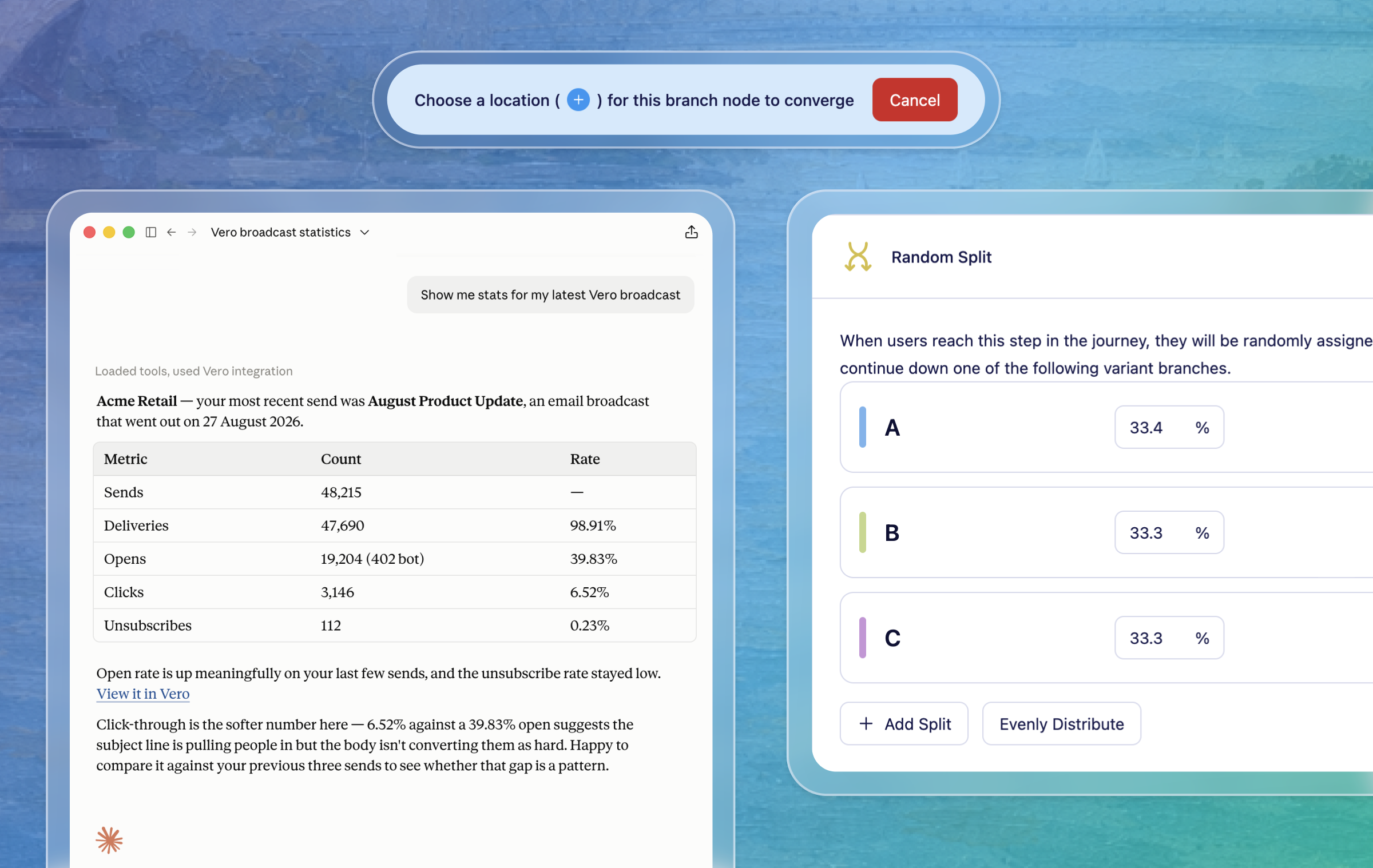
Campaign links returned from MCP-powered broadcast tools - When a broadcast is created or updated through MCP-powered tools, Vero can now return a direct campaign link, making it easier to review the campaign in Vero before scheduling or sending.
Filter nodes for Journeys in Vero 2.0 - To match our Vero 1.0 functionality, Journeys now support Filter logic to control who continues through a journey - these use the same conditions as true/false nodes and simply eject the users that don’t meet the conditions.
Transactional setting for each Journey email in Vero 2.0 — You can now independently mark every email as transactional or not, so you can send to unsubscribed profiles where appropriate in your journey. This is an improvement over Vero 1.0 which only allows setting the whole Workflow transactional.
Journey UI updates - We tidied up the journey canvas at smaller screen sizes, kept editing controls easier to reach, improved the default preview zoom, and added keyboard shortcuts for faster navigation.
Open campaigns in a new tab - We fixed a small annoyance that prevented opening campaigns in new tabs using the standard cmd/alt + click modifier shortcut.
Scheduled campaign times now display more reliably - We fixed an issue where scheduled times could appear incorrectly in campaign status controls, and aligned scheduling to use the start of the hour by default.
More reliable profile counts - We fixed an issue that could cause profile counts for All, Subscribed, and Unsubscribed views to appear inconsistent in some cases.
More accurate segment refreshes - We improved how segment membership updates handle duplicate profile records, helping refreshed segments stay accurate.
For any questions don’t hesitate to reach out to support@getvero.com
July 9th, 2026
New
Vero 1.0
Vero 2.0

We're very excited to announce the Vero MCP server: you can now manage your broadcasts and journeys from AI assistants like ChatGPT, Claude Code, and Notion, in plain language instead of clicking through the UI or writing API calls by hand.
Vero now has a Model Context Protocol (MCP) server that connects your account to any MCP-compatible AI assistant. Ask your assistant to draft a broadcast, check a journey's status, or list what's scheduled this week, and it can do it directly against your Vero data. The server calls the same Campaigns API that powers the dashboard, so nothing about your account changes underneath you, it's just a new way to work with it.
Assistants can list and read your broadcasts, create new broadcast drafts, update a broadcast's name or schedule, and manage A/B test message arms and their localized content.
Assistants can list your journeys, read a journey's full graph of triggers, nodes, and edges, and read journey messages and their localized content. Journey creation and editing from AI assistants is in the works and will be available in a future release.
Learn how to set up the Vero MCP server
For any questions don't hesitate to reach out to support@getvero.com
Note: This is an early access release. The available tools reflect what's shipped today and may change as we hear from customers using it.
June 25th, 2026
New
Improved
Fixed
Vero 2.0

Here's a round-up of what we've shipped in Vero 2.0 over the past couple of weeks.
CSV importing in Vero 2.0 – We've added the CSV import flow that walks you from upload → mapping → review, so you can get users and data into Vero 2.0. The mapping step matches your columns to the right fields with clearer defaults and makes it easy to fix anything before you commit, bringing one of the most-used parts of Vero 1.0 across to Vero 2.0. Learn more
Compact sidebar – We’ve added a slim version of the main sidebar navigation which can be toggled to give yourself more horizontal space to work with. It switches on automatically on smaller screens, and you can toggle it back any time.
Suppressions now visible on profiles – Profiles now show a new suppression and bounced statuses panel, making it easier to see why messages aren't delivering for a given person. If you have the right permissions, you can also remove a suppression from the profile — with clear warnings about the deliverability and compliance impact before you do.
Campaign labels shown on campaign page – To improve how you organise your Vero 2.0 campaigns, we now allow adding and removing labels to both broadcast and journeys. This matches the same feature in Vero 1.0. We’ve also updated the campaign list layout to accommodate the labels and make all the information fit nicely.
Event properties in the data inspector – For event-triggered campaigns, we have added event properties to the “Data inspector” menu and “Insert data” controls when editing content. Meaning you can more easily add event based liquid variables into Email, SMS, and Push content.
Campaign list filtering improvements – We’ve improved how you filter your campaigns lists. We have included a single “Filter” menu that includes dropdowns to filter by “Status” and “Labels”.
Insert properties at cursor position - When using the data inspector to add liquid variables to your content (in the rich text and html editors) clicking on a property will now insert the variable at the position of your cursor. Use the ‘insert data’ menu in the drag and drop editor for the same functionality.
Event triggers no longer remove your audience prematurely – Switching a campaign trigger to "Event" no longer prompts to remove the existing audience before a valid event has been selected. Errors are also clearer if you try to save without choosing an event.
A/B test winner and loser labels now display correctly – A/B test insights now correctly identify the top-performing variant as "Winner".
Rich text previews now use the correct font – Email previews and thumbnails now render with the same default font used in the editor, so the preview more closely matches what recipients will see.
SMS editor toolbar is now fully visible when scrolling – Fixed a styling issue that in some cases caused the SMS editor toolbar to appear transparent when editing longer messages.
May 25th, 2026
New
Vero 2.0

Push notifications are now available in Vero 2.0, across both Broadcasts and Journeys. You can configure a push provider, design content with our basic or advanced editors and configure to send on an event trigger — bringing Vero 2.0 to full multi-channel parity for push.
Configure a push provider — Add and manage Amazon SNS push providers directly from the Channels page in Vero 2.0. Set your region, credentials, and the iOS and Android services Vero should send through, and give each provider a friendly name. Twilio is also supported as a legacy provider for existing customers. Read the help docs to learn how to add a Push provider and how to start tracking push tokens.
Push in Broadcasts and Journeys — Select Push as the channel when creating a Broadcast, or drop a push node into a Journey to trigger notifications as part of an event-triggered flow. Both follow a similar flow for setting up and editing your push content. Read the docs to learn about using push in Broadcasts and adding a push nodes to Journeys.
Basic and Advanced editors — Use the basic editor for standard pushes (title, body, image, iOS and Android app links) or switch to the advanced editor to write raw iOS and Android payloads in a code editor. Both support Liquid merge tags via "+ Insert data" for personalisation.
Reporting — Push campaigns include Sent and Opened stats (with configuration) on the engagement summary and historical chart.
A note on audiences: push is available for event-triggered campaigns only. Device tokens must be added to Vero via the API.
For any questions don't hesitate to reach out to support@getvero.com.
May 21st, 2026
New
Improved
Fixed
Vero 1.0
Vero 2.0

Here’s what we’ve shipped since our last update…
New: Dynamic timing options in Journey delays (now in Vero 2.0) – Dynamic delay options are now available in Vero 2.0, including delays based on a dynamic date/time stored on a user or event property, or holding delivery until a specific time of day in the customer’s timezone.
New: Create projects in Vero 2.0 - You can now create new projects in Vero 2.0 under your main account, meaning they can be billed under your existing account like projects created in Vero 1.0.
New: Advanced Liquid discarding tag - In both Vero 1.0 and 2.0, you can get more control over when messages send - using advanced logic in email templates. It’s now possible to conditionally stop a message from sending using Liquid syntax, and include a custom failture reason that’s captured and reported in activity logs. Read more about liquid discard
Improved: More detailed failure context in activity logs – Failed events now include the failure type, timestamp, and reason in the activity details view. This makes it easier to see hard bounced, soft bounced, quiet hours, liquid discards and other failures in the activity logs.
Fixed: Selector dropdowns now scroll inside dialogs – Fixed an issue that caused dropdown data to be hidden in some dialogs and modals.
Fixed: Query editor ID icon – Fixed an issued where the required ID column on the SQL editor caused the UI to break and also not show the correct icon. It now works as intended and displays the correct icon in the query editor.
May 8th, 2026
New
Improved
Fixed
Vero 1.0
Vero 2.0

We’re back again with another quick run down of everything we shipped in the last few weeks:
New and Improved:
Project-level reporting on the home page - The Vero 2.0 homepage now shows a snapshot of your whole project’s messaging performance. At the top of the page you'll find top level summaries covering messages sent, open rate, click rate, delivery rate, unsubscribe rate — With options to view 7/30/90 date ranges, and delta comparisons for the prior period. Below the summary tiles, a new engagement chart plots your key metrics over time. You can toggle which stats appear using the checkboxes, so you can focus on the signals that matter most to you. It's the fastest way to understand how your account is performing without having to dig into individual campaigns.
Project delivery modes - Vero 2.0 projects can now be set to Live, Test, or Offline mode, with clear status indicators throughout the app. Test mode sends to a configured test email address, while Offline mode blocks delivery entirely. Launch screens now show warnings when a project is in Test mode and prevent sends when a project is Offline, helping teams avoid accidental sends. Read the help doc
Scope Journey conditions by event property - Vero 2.0 now supports condition scoping, letting you evaluate true/false node conditions against a specific event property value — so Vero matches events that share that value with the trigger event. This is particularly useful for abandonment-style Journeys, where a user might interact with multiple items and you want to follow up independently for each one they don’t act on. Read the help doc
Simpler navigation for project and account actions – Vero 2.0 now puts project switching, project settings, account access, and logout in one sidebar dropdown, so common actions are easier to find in one place.
Broadcast stats appear sooner – Broadcast rows now show key performance stats as soon as a send starts, instead of waiting until the broadcast is marked as sent. That gives teams earlier visibility into delivery and engagement while a broadcast is still in progress.
Fixes:
Safer event editing permissions - View-only teammates can no longer edit event descriptions.
Billing Fixes - fixed a billing page crash on subscriptions with multiple Stripe plans or missing metadata.
Smoother SQL editor on smaller screens – The SQL query editor layout has been cleaned up on narrower screens, with clearer required-column guidance and a simpler results header.
Journey true/false node issue - Fixed a bug that caused inconsistent path rendering when adding a true/false node in a Journey’s canvas.
Export button hidden - Fixed a bug that prevented the Export activity button on a user profile from being accessible if there was no activity in the last 30 days.
Workflow campaigns not present in Series conditions - Fixed an issue that prevented workflows campaigns from being selectable in Series filters in Vero 1.0.
May 6th, 2026
New
Vero 1.0

You can now CC additional recipients on emails sent from Vero 1.0 campaigns. With support for CC in Vero 2.0 coming very soon.
Keeping stakeholders in the loop just got easier. Whether you're sending transactional alerts, internal notifications, or customer-facing emails, you can now CC additional addresses directly from the campaign editor— no workarounds required. BCC support was already available; CC is now right alongside it.
Open the “To” panel in your campaign’s email step, select the "Include CC/BCC" option and you'll find two clearly labelled inputs — CC first, BCC second. Both CC and BCC fields accept multiple comma-separated addresses, and support Liquid — so you can dynamically set recipients based on user or event properties. CC and BCC addresses also appear in the read-only summary view so you can confirm your configuration before publishing.
For any questions don't hesitate to reach out to support@getvero.com
March 24th, 2026
New
Improved
Fixed
Vero 2.0

Not every update is a headline feature — and we're okay with that. Some of the most meaningful improvements are the ones that make Vero feel sharper to use every day: keyboard shortcuts, better sorting so the right things surface first, fewer rough edges. There's plenty of bigger things in the works, but we know the small stuff matters too. We hope the updates shared today makes your day-to-day a little easier.
New: Command Palette – Hit ⌘K (or Ctrl+K) in Vero 2.0 to show a command menu with options to quickly navigate to any part of Vero using just the keyboard. Right now it covers all the main sections of the app, and we'll be adding more shortcuts over time to make getting around even faster.
New: Forms – Forms have been a staple of Vero 1.0 for a long time, and they're now fully manageable in Vero 2.0. All your existing forms carry over, and the new UI is a lot nicer to work with.
New: Profile Activity Exports – You can now export a full CSV of any user profile's activity — every tracked action and message interaction — straight from the profile activity tab in Vero 2.0.
New: Exports Page – There's now a dedicated page in Vero 2.0 to view and manage all your exports, including those from Vero 1.0. Exports that take a little time to generate will appear here with a secure, expiring download link.
New: Campaign Celebration 🎉 – We added a little confetti moment when you send a broadcast or launch a journey. You've done the work — we figured it deserved a proper send-off.
Improved: Campaign and Profile List Sorting – Lists in Vero 2.0 now default to sorting by last updated, so what you're actively working on is always front and centre. A new sort menu gives you better visibility of the ordering and more sorting options too.
Fixed: Profile Merge Race Condition – Fixed a bug that in some rare cases could cause both profiles to be deleted during a concurrent merge operation.
Fixed: Conditions Disappearing on Resize – Fixed a bug where in some cases unsaved segment conditions would disappear when resizing the browser window.
March 23rd, 2026
New
Vero 2.0

True/False and Exit nodes are now live in Vero 2.0 Journeys. You can now build conditional workflows that route customers down different paths based on their behaviour, properties, and actions — bringing true branching logic to Vero 2.0 Journeys for the first time.
This node works as a branch in your Journey, evaluating conditions at the point a customer reaches it and routing them down one of two paths. You can build branching logic using the same conditions available in Segments — including user properties, event history, message interactions, and segment membership — giving you precise control over how customers move through your campaigns.
Branches automatically rejoin after both paths complete, so there's no need to manually connect them. You can also nest branches inside branches to build more complex journeys.
Read more about True/False nodes in our help docs
The Exit node gives you a clear, explicit way to remove customers from a Journey at a specific point. When combined with a True/False node, it achieves the same filtering behaviour as the Filter node in Vero 1.0 Workflows — with the added benefit of making exit points clearly visible on the canvas, so the logic of your Journey is easier to read and reason about.
Read more about the Exit node in our help docs
True/False nodes support two conditions unique to Journeys:
Trigger event property — branch based on a property of the event that originally triggered the Journey
Has not performed event since entering this Journey — branch based on whether a customer has taken an action since the Journey began
To start using True/False and Exit nodes, open any Journey in Vero 2.0 and use the + button to add a True/False node to your canvas. From there, define your conditions using the condition builder and optionally add an Exit node to the end of either path.
For any questions don't hesitate to reach out to support@getvero.com
March 6th, 2026
New
Vero 2.0

We're excited to share that SMS is now available in Journeys in Vero 2.0. You can now include text messages in your automated workflows, adding SMS to your multi-channel marketing strategy alongside email.
Journeys now supports SMS messaging with a dedicated SMS node. You can build automated SMS workflows triggered by user events and behavior, allowing you to send timely, personalized text messages based on customer actions. Whether you're sending order confirmations, appointment reminders, cart abandonment messages, or follow-ups, SMS gives you a direct line to your customers as part of sophisticated, multi-step campaigns.
Learn how to add an SMS node to your journeys
You can now track and store phone numbers for your users via the API using the phone_number property. Phone numbers are displayed in user profiles and used as the channel address for SMS campaigns, giving you a complete view of how to reach each customer. This unlocks the ability to send automated SMS messages in Journeys to users who have been identified with a phone number.
Learn how to track phone numbers to user profiles
To start sending SMS messages in Journeys, you'll need to:
Track phone numbers for your users via the API using the phone_number property
Configure your SMS provider in Vero 2.0 settings
Add SMS nodes to your Journeys and craft your messages
For any questions don’t hesitate to reach out to support@getvero.com